
Every workday, thousands of dev teams gather for a quick meeting to sync up. Yet many walk away wondering if the 15 minutes were worth it. Standups are arguably the most adopted Scrum event: 87% of Scrum teams hold daily standups, according to the Scrum Alliance’s State of Scrum survey. Popularity, though, does not equal effectiveness. In practice, some standups energize the team, while others feel like recycled status reports.
In this article, we explore what makes standup meetings genuinely useful for a dev team. We’ll also cover common pitfalls to avoid, along with hands-on tips for engineering managers and team leads running these meetings. Additionally, you will find here guidance for remote teams and an honest look at whether daily standups are needed at all.
TL; DR: Key Takeaways
- Daily standups are meant to coordinate the development team, not report progress to a manager
- Keep them under 10-15 minutes, focused on the sprint goal, blockers, and next steps
- Long standups often reveal a deeper issue: progress inside work items is not visible enough
- For distributed teams, async-first practices and shared documentation matter more than the meeting itself
- Effective standup meetings inside Jira lean on a tidy board, swimlanes, and lightweight checklists
- Not every team needs daily standups. Evaluate your context, and adjust the frequency to match your team’s needs
What Is a Daily Standup Meeting for a Scrum Team?
You probably already know the answer – but, still, it’s useful to start with the definition to make sure we are on the same page.
A daily standup is a short, time-boxed meeting held every workday. In the Scrum framework, it is also called a daily scrum. Its purpose is to align the development team on the sprint goal, share plans for the day, and flag any blockers.
Most teams allocate about 10-15 minutes for scrum meetings. Many run them at the start of the day, when everyone is fresh and focused. The scrum master often facilitates, but the meeting belongs to the team. In mature agile teams, the daily scrum often runs without a dedicated facilitator.
Common Standup Meeting Formats
Different agile teams run their daily scrum in different ways. Here is how the most common approaches work in practice:
Format |
How it works |
Best for |
Trade-offs |
|---|---|---|---|
Three-question format |
Each team member answers three questions in turn: what they did yesterday, what they plan to do today, and what is blocking them. The scrum master or a rotating facilitator keeps the order. This is the classic by-the-book approach. |
New Scrum teams are learning the daily rhythm. |
Easily drifts into status reporting. Feels repetitive when the sprint work is already visible in Jira. |
Walking the board |
The team walks through the Jira board from right to left, starting with items closest to Done. The owner of each work item speaks briefly when their item comes up. Nobody talks unless there is a work item to discuss. |
Sprint-focused teams that track work in Jira and want the meeting anchored in real progress. |
Only works if the sprint backlog is tidy and up to date. A messy board slows the meeting down. |
Round-robin |
Team members speak in a fixed order, one after another. A shared token, a name list, or alphabetical order sets the sequence. Each person gets the same short slot to share updates and flag blockers. |
Teams that want every voice heard, especially remote ones where speaking up can feel awkward. |
Slower for larger development teams. Can feel mechanical if used every day without variation. |
Focus on blockers only |
Team members skip status updates entirely. They only speak if they have a blocker or need help from someone. Silence means work is on track. The meeting ends as soon as all blockers are named. |
Senior teams with strong written communication habits and visible work in Jira. |
Skips general awareness of what teammates are doing. Not a good fit for newer teams still building trust. |
Asynchronous standups |
Each engineer posts a written update in Slack, Jira, or a tool like Geekbot at a set time. Teammates read and respond during their working hours. There is no live meeting. Alternatively, team members can record short videos with Loom and post them in the dedicated communication channel. |
Distributed teams across many time zones. |
Loses live problem-solving and quick back-and-forth. Requires strong writing and documenting habits. |
The best format depends on team size, seniority, and how much of the work is already visible in Jira. You can also combine different approaches – for example, round robin or asynchronous standups can follow the traditional three-question format.
As you can see from the table, each approach has its strengths, as well as weaknesses to watch out for. In the next section, we’ll explore other common issues you should know about.
6 Signs Your Daily Standup Meetings Might Need a Reset
To add more color, here’s a real-life example: I once attended a standup meeting that lasted over 2,5 hours… Well, actually, more than once. In one of my former teams, the manager was eager to resolve each blocker on the spot. This was well-meaning, but the meeting quickly turned into an extended peer review session, with discussing each task in depth, brainstorming ideas and directions, and even trying them out immediately.
Although these collaboration sessions were meaningful, it’s rather hard to start every day with such a prolonged meeting when you already have your own to-do list to work on.
Hopefully, such extreme examples are rare for most agile teams. However, this is a vivid illustration of how standup meetings can easily become a burden for everyone when done wrong.
Here are the most common signs to watch for. You know your standup meetings need a reset when:
- The meeting regularly runs past 15 minutes. Occasional overruns can happen, but a steady pattern points to a deeper issue. Usually, it means the standup is being used for problem-solving or discussions that belong in a separate call.
- People multitask during the call. If engineers keep their laptops open or drift into Slack during the standup, the meeting is not landing for them. That is a clear sign that the content is either too generic or aimed at the wrong audience.
- Blockers repeat for days without resolution. When the same blocker shows up morning after morning, the standup has become a reporting ritual. The point of naming a blocker is to trigger help, not to log it repeatedly.
- The same person dominates the conversation. When one voice takes over the standup, the meeting is out of balance. Other engineers might hold back their updates, and useful information can remain unspoken.
- People ask if they can skip the standup meeting. When team members start looking for excuses to opt out, the format has stopped serving them. That is usually a signal to reset the meeting, not to enforce attendance.
- Debugging happens in the meeting. When two engineers dive into a technical problem while everyone else waits, the standup turns into an ad hoc working session. That conversation belongs in a follow-up call with only the relevant people.
Running standup meetings effectively is important – not because it simply must be done by the textbook, but because the cost of doing it wrong is tangible and rather high.
What is the Cost of a Bad Daily Standup?
A poorly run standup is more expensive than it looks. The time on the calendar is only the visible cost, while the real damage adds up across the whole development team in ways that are harder to spot on any single day:
- Loss of prime focus windows for developers. According to Microsoft’s 2025 Work Trend Index, half of all meetings land in the 9-11 am and 1-3 pm windows, exactly when focus is at its peak for most people. A tight, well-run standup fits neatly into that morning/afternoon slot, while a long and messy one bleeds into the deep work hours that follow.
- Blockers that surface too late. When the meeting loses focus, real blockers get buried under general status updates. By the time an impediment gets proper attention, the sprint may already be halfway lost.
- The sprint goal loses its shape. If the standup turns into a series of individual reports, the shared goal fades into the background. The team stops connecting daily work to the outcome they committed to at sprint planning.
- Erosion of trust between the team and management. When the standup becomes a manager-facing report, engineers feel monitored rather than supported. Over time, that shifts the meeting from a coordination tool into a compliance ritual, and trust suffers on both sides.
- Meeting fatigue and lower morale. Long, unfocused meetings drain energy before the workday even starts, which negatively affects performance and productivity.
Here’s how Rebecca Hinds, who founded The Work Innovation Lab at Asana, describes this problem, based on their State of Work Innovation report:
The wasted time is bad enough. But our research has found that unproductive meetings often come with a second hit: the meeting hangover – that lingering brain fog and frustration that follows a bad or draining meeting. In 2024, workers reported having meeting hangovers after 28% of their meetings.
All these effects compound over time. The wasted meeting minutes are the obvious part. You can price them easily against your team’s blended engineering rate. Harder to estimate is the impact on team efficiency and overall productivity. Those losses rarely show up on a P&L, yet they quietly shape how a team delivers over time.
In the next section, we’ll talk about how to turn these meetings into a source of benefits rather than drawbacks.
How to Run Efficient Standup Meetings Everyone Loves
Good standup meetings are short, focused, and predictable. The team shows up, quickly aligns on the sprint goal, flags impediments, and gets back to work. The rest is a matter of format and discipline. Here are the practical rules that make the difference.
9 Practical Tips to Get the Status Meeting Format Rightp
-
- Set a hard time limit of 15 minutes. If a discussion runs longer, park it and continue afterward with only the people involved. Some teams use an egg timer to help them measure time.
- Hold the standup at the same time every day. Predictability reduces friction and helps the team plan their focus hours around it.
- Stand up, or turn the video on if the team is remote. Both keep energy up, help the team stay focused, and naturally shorten the meeting.
- Keep the guest list tight. The core group is the development team, the scrum master, and the product owner. Stakeholders are welcome as observers, but not as active participants.
- Ask everyone to prepare a short sync note in advance. For example, each team member posts three lines in a shared Slack thread 15-30 minutes before the meeting: yesterday’s focus, today’s plan, one blocker, if any. By the time the standup starts, everyone has read the room, and the discussion goes faster and sharper.
- Rotate the facilitator and let the team drive. A weekly rotation gives each team member a turn to lead. It shifts ownership of the standup to the team, rather than leaving it as something the manager runs on their behalf.
- Add a “play catch” element to keep everyone engaged. Some teams toss a ball, pass a token, or a virtual emoji from one speaker to the next. For example, the Jira team tosses a beach ball at their standup meetings, and no one can toss it to someone next to them or to someone who has already spoken. This creates a more informal atmosphere and helps keep everyone’s attention focused – after all, it’s hard to catch a beach ball when you are reading Slack.
- End with clear action items and owners. Anything that needs a deeper conversation goes into a follow-up call.
- Skip the standup when it does not add value. If the whole team is heads-down on the same problem or already fully aligned, a meeting for its own sake only slows things down.o
What You Should (and Should Not) Do in a Standup
Standup meetings work best when engineering managers and team leads take a step back. The team is the audience, not you. Your role is to observe patterns, remove obstacles, and give people room to coordinate with each other.
Do:
- Let people talk to each other, not to you. Sit slightly outside the circle if that helps
- Listen for repeated blockers – they can be a signal of systemic issues
- Watch for people who never speak up or who always dominate the conversation, taking up too much time
- Pay attention to patterns that emerge across sprints rather than just focus on individual updates. The value of attending as a manager comes from seeing how the team moves over time, not from noting who did what yesterday
- Ask for feedback on standup effectiveness during retrospectives. The team knows better than anyone whether the format is working. Retrospectives are the right place to adjust the rhythm, format, or attendee list
Don’t:
- Do not answer questions that team members can answer for themselves. Jumping in with answers trains engineers to defer to you. Give them the space to sort it out on their own.
- Do not turn the standup into a performance review. Judging updates in real time kills the psychological safety that the meeting depends on. Feedback belongs in one-on-ones, not in front of the team.
- Do not interrupt engineers mid-update with follow-up questions. Save them for after the standup so the meeting keeps its rhythm.
For more tips, please see the article How to Run Effective Daily Stand-Up Meetings.
How to Conduct Standup Meetings for a Distributed Dev Team
Remote teams face different challenges than colocated ones. Time zones, screen fatigue, and thinner informal communication all change the shape of a good daily scrum.
The trend is clear: 30% of meetings now span multiple time zones, up 8 percentage points since a few years ago, according to Microsoft’s 2025 Work Trend Index Annual Report. More distributed teams are trying to find a shared meeting hour that respects everyone’s working day.
Here are a few hands-on tips for effective standup meetings in a remote team:
- Rotate the standup time every quarter if your team is spread across different regions. That way, no single time zone always takes the inconvenient slot
- Turn on video by default. Faces build trust in a distributed team
- Keep an async fallback. For example, anyone who cannot attend live can post a written update on Slack
- Post a summary in the team channel immediately after each meeting, so that teammates who weren’t able to join can catch up at a glance
- Ask each engineer to post a one-line update before the call. That alone cuts standup time in half
Here’s one more practical tip from Oleksandra Sokol, Product Lead at TitanApps by Railsware:
Over 70% of the Railsware team works remotely, so we split communication into sync and async. Before scheduling a new meeting, we ask three questions: Am I blocked on this? Does my colleague need to know this right now? Is it urgent enough to interrupt their work? If not, it becomes an async Slack thread. When communication is well organized, the team doesn’t feel the need to offload everything into one standup.
It’s also worth mentioning that building an effective distributed dev team is a challenge in itself, but it can be mitigated by working with an experienced partner. Lemon.io helps startups and scaleups hire pre-vetted senior developers who are ready for remote-first work. Their vetting process focuses on both technical skill and remote work experience, so new hires can plug into your standups and sprint rituals without a long ramp-up.
For more on this topic, please see the article How to Manage Remote Developers in 2026.
How to Support Standup Meetings Inside Jira
Jira board is an important part of your standup meetings, so you need to make sure it’s configured well:
- Map columns cleanly to your Jira workflow. The board should reflect the actual stages your work moves through – this makes it easier to assess progress at a glance.
- Use swimlanes to group by assignee, epic, or feature. Grouping by theme helps your team discuss tasks by feature rather than by person, which shifts the conversation from status to progress.
- Add board filters for “at risk” or “blocked.” This will allow you to easily filter out problematic work items and focus on them during the meeting.
- Keep the sprint board tidy and up to date. Stale work items slow the meeting down and blur the picture of what is really in flight.
- Use checklists to make progress on tasks visible. Complex or high-stakes tasks often hide their real state behind a single Jira status. It can stay “In Progress” for a long time, but how much progress has actually been made is unclear. Adding a checklist inside the work item breaks it down into concrete steps, so the team can see exactly how far the work has progressed and what remains. You can easily do this with Smart Checklist for Jira.
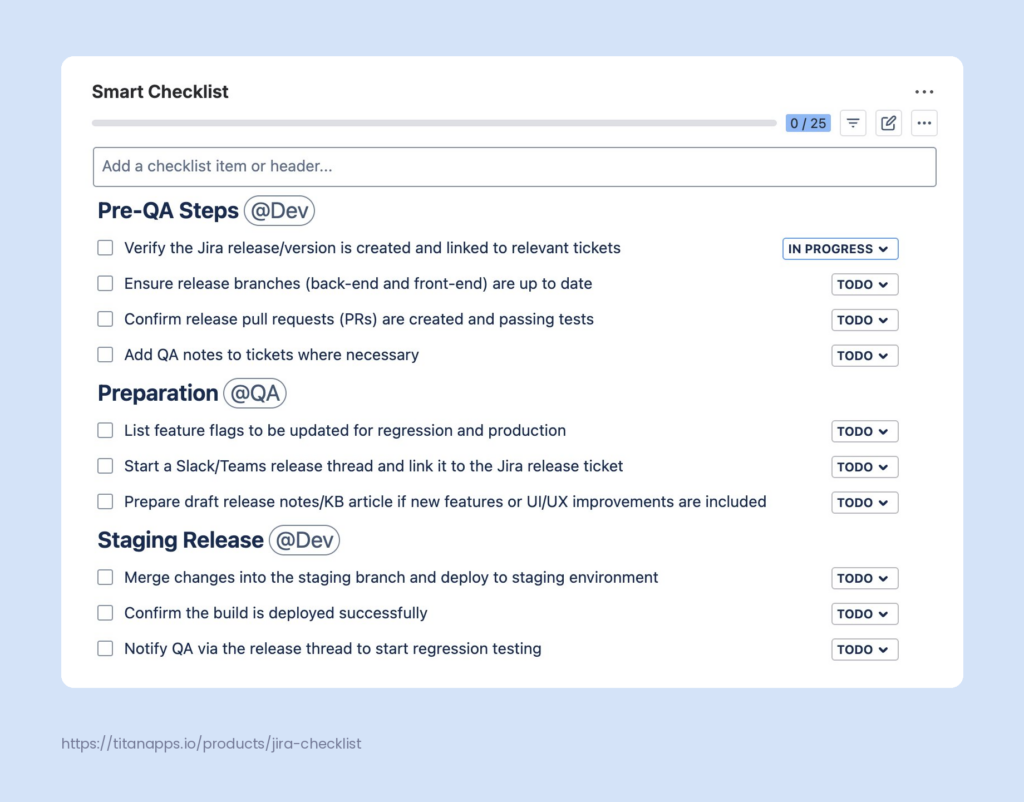
In this example, the Release Readiness Checklist is used to coordinate the dev and QA teams. It increases transparency and reduces the need for detailed explanations during the standup meetings.
Smart Checklist for Jira allows you to add feature-rich checklists inside any work item. Each step on the list can have its own progress status, due date, assignee, priority, and an expandable field with details. The solution also enables you to save checklist templates for recurring tasks and add them to work items automatically based on custom conditions. Additionally, you can configure your Jira board to display checklist progress on work item cards.
Checklist templates are useful not only for multi-step tasks but also for enforcing quality standards. Some common use cases include the Definition of Done Checklist Template and the Code Review Checklist. They help you ensure that everyone goes through the same steps every time. This promotes consistency and helps your team maintain high-quality standards, which is especially important for distributed development teams.
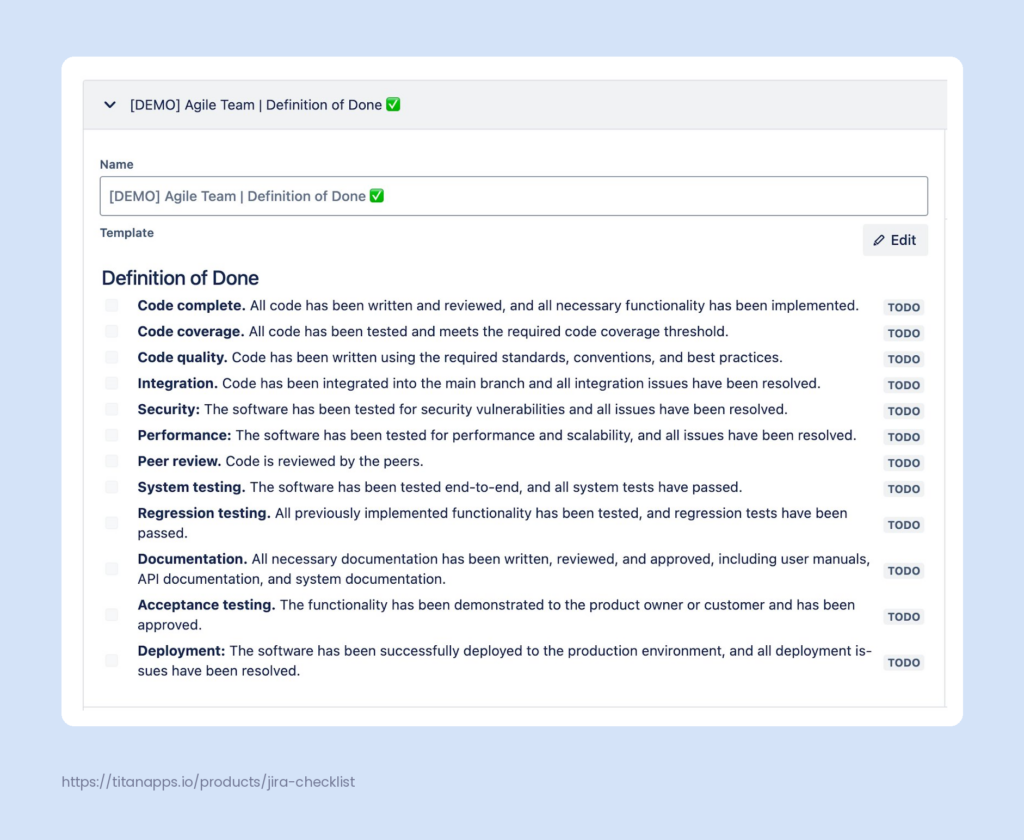
In addition to its native automation features, Smart Checklist can also be used together with Automation for Jira.
To add such checklist templates to your Jira work items, install Smart Checklist from the Atlassian Marketplace.
Does Your Team Actually Need Daily Standup Meetings?
Not every team benefits from a daily standup. There are different perspectives worth weighing. Some voices in the industry argue that daily standups and agile meetings in general are overrated. In her interview on Lenny’s Podcast, Melissa Perri, founder and CEO of Product Institute and author of Escaping the Build Trap, put it bluntly:
When you do Scrum by the book, or how people teach it and how they write about it, it’s a million meetings. I know they were put in there so that people were forced to talk, but when you already know what syou’re supposed to work on, why do you need to keep doing meetings? Shouldn’t you just go do some work?
The data backs up part of her point. Atlassian’s survey of 5,000 knowledge workers found that 78% feel expected to attend so many meetings that it hurts their real work.
Companies solve this in different ways. For example, Atlassian allows teams to pick their own rhythm. When describing standup meetings at Atlassian, they noted that some teams meet daily, while others meet three times a week. Some other companies handle standups fully asynchronously or use weekly meetings instead of daily syncs.
So, are daily standup meetings essential? The answer depends on your team size, your work style, and your context. Small, senior teams with strong async habits can often skip them, as well as small teams working in the same room, where it’s easy enough to stay synced during the day. At the same time, new teams, teams tackling complex user stories, or teams onboarding a new employee usually benefit from a daily rhythm. The best move is to evaluate your team’s real needs and adjust flexibly, rather than following the Scrum playbook to the letter.
Frequently Asked Questions About Standup Meetings for Dev Teams
-
How to Organize Daily Notes for Standup Meetings?
Written notes make standups more useful over time. They help remote teams stay in sync, and they give new joiners a clear on-ramp.
Atlassian offers a simple daily standup template in Confluence that many teams adopt out of the box. Some teams keep standup notes in Notion or Google Docs. Others use a lightweight Slack thread and pin the summary at the top. Here’s an example of a standup meeting notes template from Atlassian:
 t
t -
Are Standup Meetings Different Across Agile Methodologies?
Yes. Each framework treats the daily meeting a little differently:
-
- Scrum. The daily standup is called the Daily Scrum. It is one of the five mandatory Scrum events, capped at 15 minutes, and owned by the development team. The focus is the sprint goal and the plan for the next 24 hours. The current Scrum Guide no longer prescribes fixed questions, so teams can pick their own format.
-
- Kanban. The meeting exists, but the format is looser. Kanban teams typically “walk the board” and focus on the flow, work-in-progress limits, and blocked items, rather than on individual updates. Some Kanban teams meet less than daily if their process does not require it.
-
- Extreme Programming (XP). XP is actually where the term standup was popularized. XP standups focus on coordination for the day ahead and pair-programming decisions, with less emphasis on formal reporting.
-
- SAFe. The Scaled Agile Framework calls it the Daily Stand-Up (DSU). SAFe recommends holding it in front of a shared board, and the questions are anchored to the iteration goals rather than the sprint goal.
In practice, most teams borrow from more than one framework, so it’s a question of what fits you best.
-
-
Who Should Run Standup Meetings in an Agile Team?
In Scrum, the scrum master often facilitates, but the meeting belongs to the development team. Many mature teams rotate the facilitator or run the daily scrum without one at all. For Kanban teams, a team lead or a rotating engineer usually takes the role.
-
How Are Standup Meetings Different from Status Meetings?
Status meetings exist to report progress to management. Standup meetings exist to help the team coordinate. If your standup feels like a status report where everyone talks to the manager, it has drifted from its intent.
-
Is a Standup Meeting the Same as a Scrum Meeting?
Not exactly. A Scrum meeting is a general term for any meeting within the Scrum framework. That includes sprint planning, backlog refinement, sprint review, and the retrospective, as well as the daily scrum. So the daily standup is one specific type of Scrum meeting, not the whole set.
 t
t