










































Front-end development is one of the hardest areas for AI coding tools. Unlike back-end engineering, where devs measure correctness by tests and program output, front-end work depends on constant visual feedback. Human developers write code while simultaneously checking layouts, interactions, animations, responsiveness, and accessibility in the browser. LLMs don’t naturally “see” these details, which is why experienced front-end engineers combine AI coding assistants with browser-aware tools and their own judgment to deliver production-quality user interfaces.
That shift has changed what startups and SMBs should evaluate during hiring. Technical skills are still important, but the biggest differentiators are now product judgment, architectural thinking, and the ability to use AI effectively without sacrificing quality.
This guide draws on what we’ve learned from vetting hundreds of front-end engineers: which skills predict success, which interview questions reveal seniority, and how to avoid expensive hiring mistakes.
Key Skills to Look for When Hiring Front-End Developers
The difference between a mid-level programmer and a senior front-end engineer appears in how they structure applications, apply innate design sense, recover from failures, collaborate with designers, and use AI without creating technical debt.
Design Systems and Scalable UI Architecture
Before hiring a front-end developer, ask how they would extend an existing design system instead of creating a new component. Senior engineers build reusable foundations that keep hundreds of screens consistent. Weaker ones solve each problem in isolation until the interface becomes a collection of nearly identical buttons, forms, and modals that are expensive to maintain.
Project example: Your SaaS product adds dozens of new features every quarter. A senior developer creates reusable UI building blocks that allow multiple engineers to ship new pages without introducing visual inconsistencies or maintaining five versions of the same component.
Application Architecture and TypeScript
Look for candidates who talk beyond types. Strong candidates explain how they organize large React or Angular applications, decide where business logic belongs, share API contracts between the front-end and back-end, and keep components reusable instead of tightly coupled.
The business value is as follows: adding a new feature shouldn’t require rewriting existing ones. As your product accumulates integrations, engineers, and customer requests, good architecture keeps releases predictable.
Project example: Your fintech platform integrates with multiple banking providers while supporting web, mobile, and an internal admin dashboard. When one provider changes its API, a well-structured application immediately highlights every affected component through shared contracts and consistent architecture.
State Management
State management is about putting data in the right place. Ask candidates how they decide what should stay inside a component, what should be shared across the application, and what should come directly from the server. Good engineers make those boundaries clear, which keeps new features from creating unexpected bugs elsewhere.
Project example: Your AI workspace lets users upload files, switch between conversations, stream model responses, and track usage credits simultaneously. A senior engineer keeps each feature isolated while sharing only the state that truly needs to be global. As the product grows, new functionality can be added without introducing unpredictable behavior across the application.
Testing That Protects Revenue
Unit tests (using Jest or Vitest) validate business logic in isolation. Integration tests verify that components, forms, and API calls work together correctly. End-to-end tools like Playwright or Cypress simulate real user behavior in the browser, from signing in to completing a purchase.
Senior engineers prioritize testing the workflows users depend on: authentication, checkout, subscriptions, permissions, search, and onboarding. They also know when to run visual regression tests or accessibility checks.
Project example: Your e-commerce business generates half of its annual revenue during Black Friday weekend. A senior engineer writes Playwright tests that simulate an entire purchase flow, verify discount codes, payment retries, and account creation, while using unit tests only for business-critical logic. If a checkout change accidentally breaks payments the night before the sale, the deployment fails before customers see the bug.
Production Observability
The best front-end engineers use applications with Sentry, real-user monitoring, performance metrics, and session replay tools to identify issues as soon as they appear in production. That reduces downtime and shortens debugging.
Project example: After a Friday release, Safari users can no longer complete checkout. Instead of waiting for support tickets on Monday, the engineering team receives an automated alert, watches affected user sessions, identifies the browser-specific bug, and deploys a fix within hours.
Performance as a Product Feature
Fast applications convert better, retain users longer, and rank higher in search results. Experienced engineers understand code splitting, image optimization, lazy loading, edge caching, bundle analysis, and Core Web Vitals. More importantly, they know which optimizations matter for different user groups.
Project example: Your travel booking platform serves customers on unreliable mobile networks. A senior developer identifies a third-party script delaying search results, restructures the loading sequence, and reduces abandonment during the booking process.
Accessibility and Inclusive Design
Accessibility means making your product usable for every customer while avoiding expensive remediation later. Ensure that candidates can build keyboard navigation, semantic HTML, accessible forms, screen-reader support, and sufficient color contrast from the beginning.
Project example: Your healthcare company lands an enterprise customer whose procurement process includes accessibility requirements. Because the application already follows WCAG guidelines, the contract moves forward without months of last-minute engineering work.
AI Tool Proficiency
Nearly seven in ten front-end developers now use AI coding tools daily. But truly skilled devs know that using a coding tool as-is won’t work in front-end development. That’s why experienced front-end engineers pair AI assistants with browser-aware tools such as Playwright MCP, Chrome DevTools MCP, and visual debugging servers like Ralph MCP. Instead of asking AI to guess what the interface looks like, these tools let it inspect the live application, click through user flows, capture screenshots, read console errors, measure performance, compare layouts with Figma, and verify responsive behavior.
In many ways, this mirrors ad hoc testing that human front-end engineers do. Rather than relying on automated assertions, they explore the application, resize the browser, inspect the DOM, reproduce edge cases, and validate that the interface behaves as expected.
Interview tip: Ask candidates which MCP servers or browser automation tools they use alongside AI coding assistants. Developers who immediately mention MCPs or visual regression workflows have much more mature AI-enabled development experience.
Security and Working Across Teams
Modern front-end engineers work closely with designers, product managers, and back-end developers while protecting users from common client-side security risks.
Look for experience with secure authentication flows, token handling, XSS prevention, Content Security Policy, and communicating technical trade-offs to non-technical stakeholders. Great engineers also know when to challenge a design that hurts usability or performance instead of implementing it without discussion.
Project example: Your customer portal allows users to create and share rich-text documents. A senior engineer prevents cross-site scripting vulnerabilities, collaborates with the design team to simplify complex interactions, and delivers a secure experience without sacrificing usability.
JavaScript, React, Angular & Vue: Choosing the Right Front-End Framework
React, Angular, and Vue all solve similar problems. The right choice depends on your product, team, and long-term roadmap.
| If you’re building… | Hire developers experienced with… | Why |
| AI copilots, SaaS dashboards, marketplaces | React + Next.js | Excellent ecosystem for complex state, APIs, real-time updates, and SEO. The largest hiring pool makes scaling the team easier. |
| Marketing websites, documentation portals, content-heavy products | Next.js | Server-side rendering, static generation, and CMS integrations deliver strong SEO and fast page loads. |
| Internal enterprise platforms, ERP, healthcare, finance | Angular | Opinionated architecture helps large engineering teams maintain consistency across complex applications over many years. |
| Startup MVPs, admin panels, customer portals | React or Vue | Both allow small teams to move quickly. Vue generally requires less boilerplate, while React offers a broader ecosystem and talent pool. |
| Existing production application | Your current framework | Rewriting a stable product rarely creates business value. Hire engineers who can modernize the existing codebase instead of replacing it. |
The best front-end engineers adapt to the stack rather than define themselves by it. React may dominate today’s market, but frameworks change much faster than good engineering judgment. When evaluating candidates, prioritize architecture, communication, and product thinking over years spent with a particular library or programming language.
Questions That Reveal Great Front-End Engineers
Here are a few we regularly ask during vetting to verify developers’ attention to detail and product design thinking.
“Tell me about a feature you decided not to build.”
Strong front-end engineers don’t blindly implement every request. They explain when a custom solution would create unnecessary maintenance, when an existing browser capability is enough, or when simplifying the interface creates a better user experience. Look for product judgment rather than technical perfection.
“How would you improve this screen?”
Open your product or a competitor’s website and ask the candidate what they’d change.
Experienced devs notice slow loading states, confusing navigation, inaccessible forms, inconsistent components, or unnecessary user friction. They naturally connect technical decisions to business outcomes like conversions, retention, and support tickets.
“What happens if the API takes eight seconds to respond?”
Most products perform well under ideal conditions. But real users don’t always have fast networks.
Strong candidates talk about loading states, optimistic updates, skeleton screens, retries, graceful error handling, and preserving user input. They understand that good UX is about keeping users informed while they wait.
Business example: If a user spends ten minutes completing an insurance application, they shouldn’t lose everything because the final request times out.
“Describe a front-end decision that improved a business metric.”
Senior engineers remember the impact of their work. Maybe they reduced checkout abandonment by simplifying the payment flow. Maybe they improved Core Web Vitals and increased organic traffic. Maybe they redesigned onboarding and increased activation. Whatever the example, they should connect engineering work to measurable business outcomes.
“When would you push back on a Figma design?”
Good candidates explain when they’d suggest reusable components instead of one-off designs, simplify an interaction that creates unnecessary friction, or adjust animations that hurt performance or accessibility. The goal is to improve the final product rather than to show off design skills.
Cost to Hire a Front-End Developer on Lemon.io
A developer with 3-4 years of experience working in React.js and TypeScript costs less than a senior frontend developer with 7+ years of experience who can architect a design system, mentor junior team members, and make infrastructure decisions. Take a look at a detailed salary report for front-end engineers in 2026 based on the survey of the developers in our community.
Angular specialists with enterprise experience tend to command higher rates than generalist JavaScript developers, because the Angular ecosystem demands deeper architectural knowledge.
Geography plays a role as well. Lemon.io sources developers from CEE, the US, the UK, Canada, Australia, and Latin America, where you’ll find high-quality engineering talent without Silicon Valley pricing. The real cost savings come from skipping the 3-6 month in-house hiring process, avoiding the $30,000+ mistake of a bad hire, and getting a vetted match instead of sifting through 200 applications on a general freelance platform.
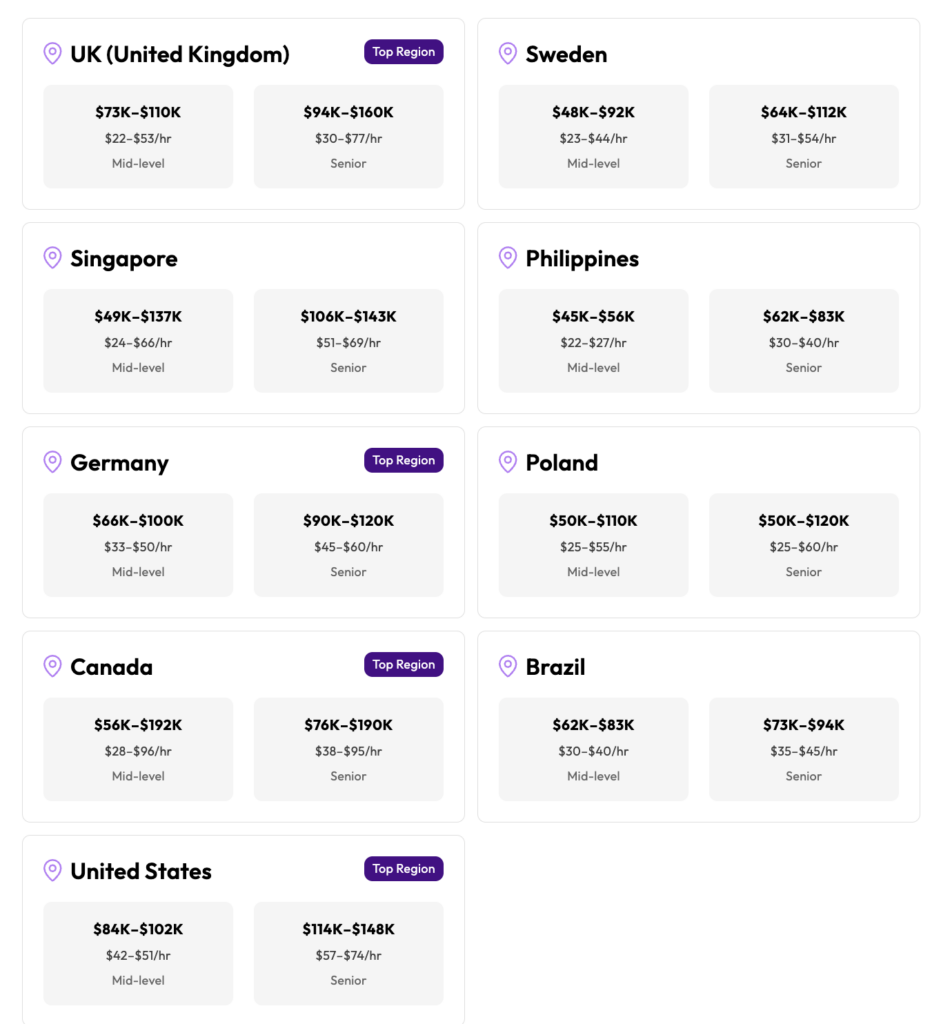
Lemon.io front-end developers’ rates across countries
Full-Time vs. Part-Time Engagement
We offer both full-time and part-time developers. For startups in early stages, a part-time dedicated front-end developer working 20 hours a week can ship an MVP without the overhead of a full salary and benefits package. Scaling teams with 10+ engineers typically need full-time embedded developers who participate in daily standups, code reviews, and sprint planning. Either way, you see the candidates, their portfolios, and their vetting scores before making a decision.
How Lemon.io Sources Top Front-End Developers
The difference between Lemon.io and posting a front-end developer job description on a job board is the vetting.
- First, we verify years of experience and portfolio depth. We’re looking at what they built, how complex it was, and whether they maintained it. A developer with 5 years of experience building marketing sites is different from one with 5 years of experience building interactive web apps with real-time data.
- Second, we run a technical assessment that covers HTML5 semantics, CSS layout and animation, JavaScript fundamentals (closures, event loop, async patterns), and framework-specific architecture. For React candidates, we test hooks composition, render optimization, and state management decisions. For Angular candidates, we test dependency injection, RxJS patterns, and module architecture. For Vue.js candidates, we test the Composition API and reactivity system.
- Third, we evaluate how candidates work with modern tooling. Do they use AI-assisted coding tools effectively? Can they set up a project with Vite, configure Tailwind, deploy to Vercel, and write a GitHub Actions workflow?
We also assess English communication and collaboration skills because a brilliant programmer who can’t explain their pull request is a liability on a remote team.
Whether you need to hire a dedicated front-end development team, find a front-end developer for a three-month sprint, or bring on a full-time senior front-end developer to lead your UI layer, we’ll show you vetted candidates within 24 business hours.